
FetchKids - Organized Pickups
Expanded Apps, Inc.Parenting
3.218.00 Reviews
- Version
- 1.7.0.3
- Installs
- 10.00K
- Age Rating
- Everyone
Screenshots
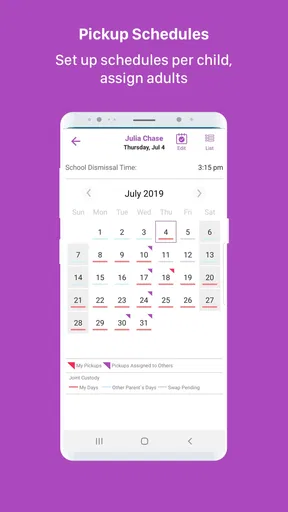
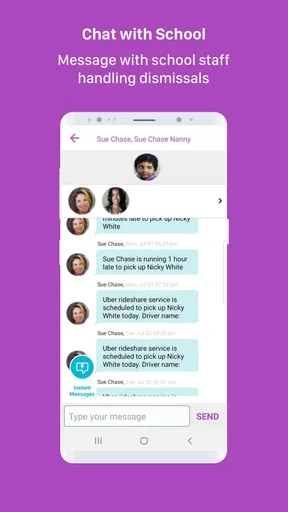
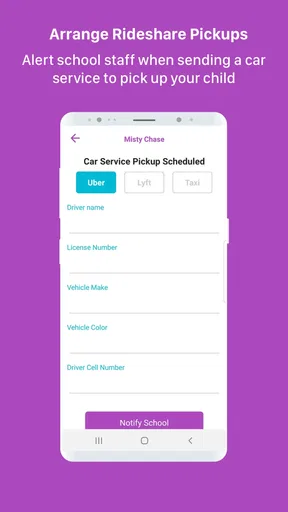
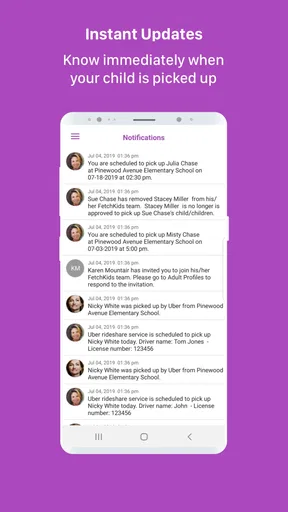
Our Review of FetchKids - Organized Pickups
 Analysis by Appyee
School pickup looks simple until several adults, changing schedules, and a busy dismissal period collide. That is the problem FetchKids is designed to address: helping schools organize how students are released rather than relying entirely on paper notes, scattered messages, or hurried conversations at the gate. I see it as a focused parenting and school-administration tool, not a general family organizer. Its value depends on whether a school has adopted the same workflow, but when the process is in place, it can give dismissal a clearer structure.
Developed by Expanded Apps, Inc., the app is free and suitable for Everyone. It runs on Android devices using at least version 5.0, and its current version is 1.7.0.3. The app has passed the early-experiment stage, with over 10 thousand installs, although its average rating sits at 3.2 from around 31 ratings and 18 reviews. I would read that combination as a reason to approach it practically: there is enough use to make it relevant, but not enough public feedback to treat it as a universally polished solution.
From a pickup request to a more orderly dismissal
I see the handoff as the real test of an organized dismissal: a request only helps when the school can act on it and the arriving adult knows what to do. In the next section, I look at the practical starting point—why a shared pickup picture matters before anyone submits a change.
The starting condition: a school needs one shared pickup picture
The strongest way to understand FetchKids is to imagine a normal weekday. A child is at school, a parent or another approved adult needs to collect them, and the school must release the right student to the right person at the right time. A last-minute change can make the familiar routine difficult: one adult may expect a car-line pickup, another may arrive on foot, and the office may still be working from an earlier instruction.
Traditional alternatives are often a mixture of handwritten lists, classroom messages, phone calls, and verbal reminders. Those methods can work for a small group, but they become harder to coordinate when several classrooms and dismissal routes are active at once. FetchKids is aimed at giving school staff a dedicated place for the dismissal process, so the important information is handled as part of one school-admin system instead of being spread across unrelated channels.
That distinction matters for parents. This is not simply an app I would install and expect to manage a child’s entire schedule. Its usefulness begins with the school’s process. If the school does not use it consistently, a parent may still need to follow the school’s usual phone, paper, or in-person procedure. Before depending on it for a time-sensitive pickup, I would make sure the school has explained exactly how families are expected to use it.
The key practical insight is that FetchKids works best as a shared handoff system, not as a private reminder app. A reminder helps me remember to collect a child; a dismissal tool is meant to help the school know what should happen when I arrive. That difference affects who benefits most. Families connected to a participating school may find it useful, while someone looking for a standalone family calendar will likely find the app too narrow.
Step one: turning the day’s pickup plan into an actionable request
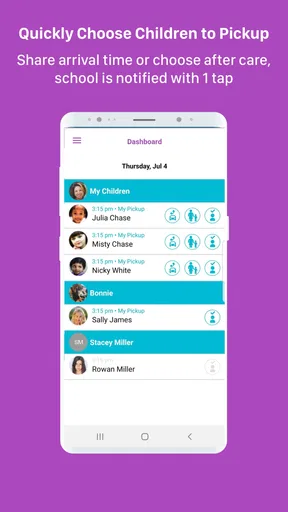
In a realistic workflow, the first task is making the intended pickup clear before dismissal begins. A parent may need to communicate that they are collecting the child, while school staff need a way to organize those requests alongside the students leaving through other arrangements. The app’s purpose is to support that administrative view, rather than leaving every decision in a teacher’s memory or on a list that can be misplaced.
I would use it most carefully on days when the usual plan changes. Suppose a child normally rides home but will instead be collected by a relative. The important action is not merely entering the change; it is making sure the school recognizes it and that the adult arriving understands the school’s handoff procedure. A digital request can make the change easier to organize, but it does not remove the need for accurate information or a clear identity check at pickup.
This is one of the less obvious trade-offs. A dedicated workflow can reduce ambiguity, but it also introduces a new step for families and staff. Everyone has to use the same process at the right time. If one person continues sending a message through a different channel, the school may still need to reconcile two sources of information. In other words, the app can organize a process, but it cannot automatically fix inconsistent habits around that process.
For parents, I would avoid treating a request as proof that the child is already ready at the door. Dismissal has its own timing and school rules. The sensible routine is to submit or confirm the plan early enough for staff to prepare, then follow the school’s instructions when arriving. That approach reduces the chance of creating a rushed exception during the busiest part of the day.
Step two: staff coordination during the busiest minutes
The school-side benefit is the ability to manage student dismissal as an organized administrative task. Instead of relying only on a teacher remembering which child is leaving with which adult, staff can work from the system the school has chosen. That can be especially helpful when several changes arrive close together or when a student’s normal routine is different for one afternoon.
FetchKids is therefore more interesting for school administrators than for parents who want a feature-rich personal app. The store summary describes it as school administration software for managing student dismissal, and that focus comes through in the way I would judge it: the important question is not whether it has entertainment value or broad household planning tools, but whether it makes the release process easier to coordinate.
A useful staff habit would be to treat the app as the operational queue for dismissal while keeping the school’s existing safety checks intact. The app should support the decision, not replace responsible supervision. Staff still need to handle unusual circumstances, clarify conflicting instructions, and use their judgment when the person arriving does not match the expected arrangement.
That is a realistic strength and limitation at the same time. A system can present a cleaner view of planned pickups, but unusual cases still require people. If a child is absent, a parent arrives unexpectedly, or two adults give different instructions, no app should be expected to resolve the situation without staff intervention. FetchKids appears most valuable for routine coordination, where reducing avoidable confusion has a direct benefit.
Step three: the handoff between school, family, and collector
Pickup is not complete when a request is entered. There is a handoff from the family’s plan to school staff, then from staff to the adult collecting the child. This is where I would pay the closest attention. A smooth digital workflow should make it easier for each person to understand what is expected, but the final release still depends on the school’s procedures and the adult’s arrival.
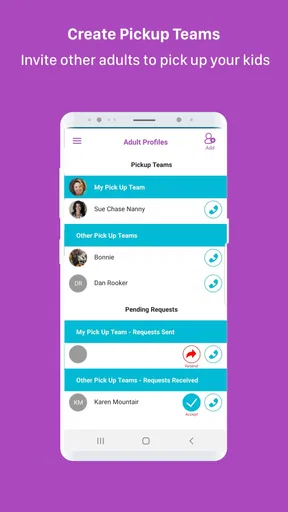
Consider a grandparent collecting a child for the first time. The parent may have arranged the change, the school may have recorded it, and the grandparent may still be unsure where to go or what to say. FetchKids can help organize the school’s side of the request, but families should not assume that the arriving adult can skip local instructions. I would send that person the school’s practical directions separately if needed, especially when the pickup location or timing is unfamiliar.
This is also where the app may be less convenient than a simple phone call. A call allows a parent to explain a complicated situation in ordinary language and ask follow-up questions immediately. A structured app workflow is cleaner for repeatable requests, but it may feel restrictive when the situation does not fit the normal pattern. I would choose the app for predictable changes and contact the school directly for anything urgent, unusual, or unclear.
Another useful insight is to separate “planned” from “confirmed.” A family may have made a request, but staff still have to process it, and the collector still has to arrive. Keeping those stages mentally separate prevents a common mistake: assuming that tapping through a digital process means the child has already been released or that the school has accepted a late change.
A realistic afternoon with FetchKids
Imagine that I usually collect my child after school, but one afternoon I am delayed and a family member needs to take over. I would begin by checking the school’s preferred process and entering the change through FetchKids rather than sending separate messages to several people. The school could then incorporate that request into its dismissal organization, while I make sure the family member knows the arrival instructions.
At the school, staff would use the organized request as part of the dismissal routine. If the relative arrives as expected, the handoff can follow the school’s normal checks. If the relative is late or the request conflicts with another instruction, staff still need to pause and clarify the situation. The app helps create a shared starting point; it does not turn a complicated exception into an automatic approval.
The outcome I would want is modest but meaningful: fewer preventable calls, less dependence on a teacher remembering every change, and a clearer route from a parent’s plan to the school’s action. That is a good result for a focused tool. It does not need to manage every part of family life to be useful during the narrow period it targets.
Where the flow breaks down
The first likely break is adoption. If only some families use FetchKids while others rely on paper or messages, staff may still have to reconcile multiple systems. The app can be well suited to a school that commits to one process, but less helpful in a mixed environment where the official method is unclear.
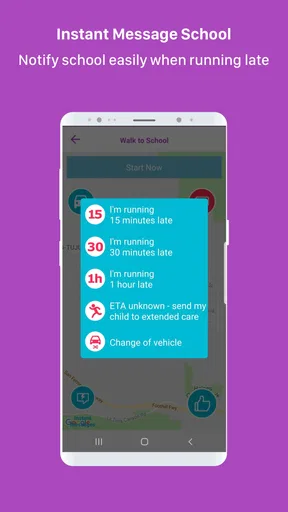
The second break is timing. A late request may arrive after staff have already organized the dismissal line. I would not use any digital submission as an excuse to make last-second changes casually. Families should learn the school’s cutoff expectations and keep a direct contact method available for emergencies. The app’s value is greatest when it supports preparation, not when it is used as a substitute for urgent communication.
The third break is unusual family arrangements. Shared custody, temporary caregivers, several children leaving through different routes, or a change involving a person unfamiliar to staff can require more explanation than a standard workflow allows. In those cases, a direct conversation with the school may be better than trying to force every detail into an app designed around organized dismissal.
There is also a usability question. A 3.2 average suggests that the experience may not feel equally smooth for every user, and the relatively small review base makes it difficult to identify a single universal pattern. I would test the process on a normal day before depending on it for a complicated pickup. Parents should also keep their phone ready and understand the school’s backup procedure rather than assuming the app is the only route.
Who should use it, and who should skip it
I would recommend FetchKids to families whose school actively uses it and has explained the dismissal workflow clearly. It is particularly suitable for parents who regularly manage changing pickup arrangements, schools with many students leaving through different methods, and administrators who want a dedicated tool instead of a collection of informal messages.
I would be more cautious if I were choosing it independently for a family. Because it is built around school administration, it cannot provide much value without school participation. It is also not the right choice for someone seeking a broad parenting suite with meal planning, calendars, child development tools, or household reminders. Its narrow focus is a benefit when dismissal is the problem, but a limitation when the need is wider.
Compared with paper lists, the app offers a more structured digital workflow and may make changes easier to organize. Compared with phone calls, it may be less conversational but more consistent for repeatable requests. Compared with a general messaging app, it is better aligned with school dismissal rather than a private conversation that staff may need to search through later. The trade-off is that a specialized system only works well when the whole community follows it.
My verdict after looking at the complete workflow
FetchKids is a focused free parenting-related app from Expanded Apps, Inc. that makes the most sense as part of a school’s dismissal process. I like the problem it targets because pickup confusion is practical, recurring, and easy to underestimate. A shared administrative workflow can help schools handle ordinary changes with less scattered communication, while giving families a clearer way to participate.
My recommendation comes with a condition: confirm the school’s process before treating the app as essential. Use it early for planned changes, make sure the collecting adult understands the handoff, and keep the school’s backup contact method available for exceptions. That routine respects both the app’s strength and its limits.
With an Everyone age rating, a free price, and support for Android 5.0 and later, it is accessible to many families using compatible devices. Still, accessibility does not guarantee usefulness in every school. I would choose it when the school has made FetchKids part of its official routine, and I would skip relying on it when staff still prefer phone calls, paper, or another established system.
Overall, I see FetchKids as a practical coordination layer rather than a complete family-management solution. It succeeds when a planned pickup moves cleanly from parent to school staff to the arriving adult. It becomes less compelling when the situation is urgent, unusual, or split across several communication channels. For the right school community, that focused approach can be enough to make dismissal feel more organized without pretending that technology can replace careful human judgment.
Verdict
Strengths of FetchKids - Organized Pickups
- Clear pickup scheduling helps families stay organized.
- Useful reminders can reduce missed pickups and last-minute confusion.
- Centralized details make sharing plans with caregivers easier.
- Designed around recurring routines such as school and activities.
- Can improve communication between parents, caregivers, and drivers.
Limitations of FetchKids - Organized Pickups
- Requires all relevant caregivers to use or regularly check the app.
- Setup may take time when entering multiple children and schedules.
- Dependence on notifications can be risky if alerts are missed.
- Limited usefulness when schools or activities lack app integration.
- Location and child-related data may raise privacy concerns for families.
Similar Picks in This Category
View All
Family Space
Motorola Mobility LLC.3.9

شرطة الأطفال - مكالمة وهمية
Oub Apps4.1

Findmykids: Parental Control
LETEM LTD4.6

Pregnancy + | Tracker App
Philips Electronics UK Limited4.8

Policía de niños - para padres
Kids police4.7

Pregnancy App
Amila4.9
Frequently Asked Questions
What is FetchKids - Organized Pickups and who is it designed for?
FetchKids - Organized Pickups is a family transportation and scheduling app designed to help parents, guardians, schools, and approved caregivers coordinate children’s pickups and drop-offs. After reviewing its purpose and workflow, the app appears most useful for families managing busy school, activity, and childcare schedules. It centralizes pickup details so everyone involved can better understand who is collecting a child and when.
How does FetchKids help organize a child’s pickup?
FetchKids helps organize pickups by bringing scheduling and participant information into one place instead of relying entirely on text messages, phone calls, or last-minute reminders. Parents can use the service to coordinate approved pickup arrangements and share relevant details with trusted people. Before downloading, users should review the available scheduling tools and confirm that the app supports their school, caregiver, or transportation routine.
Is FetchKids safe for children and family transportation arrangements?
Safety is an important consideration because the app deals with children and pickup responsibilities. FetchKids is intended to support organized arrangements among authorized adults, but parents should still verify identities, permissions, pickup locations, and account settings carefully. The app should complement, rather than replace, communication with schools and caregivers. Availability of specific safety features may depend on the participating organization or service.
Does FetchKids work with schools, caregivers, or other approved pickup providers?
FetchKids may be particularly helpful when families coordinate with schools, childcare providers, activity programs, or trusted caregivers. However, the exact experience can depend on whether the relevant organization or transportation provider uses or supports the platform. Before installing it, parents should check if their school or service has provided instructions, an invitation, or a required account setup process, since access may not be completely independent.
Is FetchKids free to download, and what should I check before signing up?
The app may be available to download without an upfront charge, but users should not assume that every feature or transportation arrangement is free. Pricing, service eligibility, organization fees, and optional charges can vary depending on the provider connected to the account. Before signing up, review the app-store listing, privacy policy, permissions, account requirements, and any terms related to children’s information and scheduled pickups.
